
“Incorpora” continues to evolve to improve user experience
“Incorpora”, the internal service portal for FCC employees, undergoes a process of continuous improvement in order to optimise and enhance user experience.
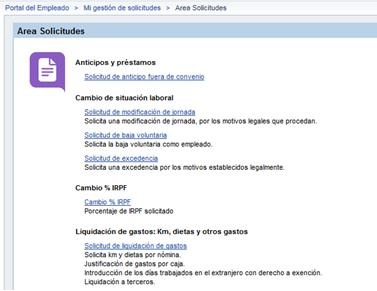
The main improvements are:
- More streamlined process for settling personal expenses.
- Enables expenses to be printed out, requests for travel and other supplementary expenses to be processed and settled through a single portal.
- Provides greater flexibility.
Starting August 9 next, the Incorpora team will implement this functionality on the Employee Portal.
Tutorials and a manual are now available.
1. How do I log on?
Log-on has not changed, it can be found on the INCORPORA employee portal under: “Mi gestión de solicitudes/My Request Management” -> “Solicitud de liquidación de gastos/Settlement of expenses request"
2. What’s new
Not only has the design changed, but also the following new features have been added:
- It allows you to save drafts as templates.
- You can start your expense settlement accounting process and finish it later.
- Copy lines from each type of expense without having to repeat matching data.
- Print out expense accounts to send to Cash & Payroll Dept.
3. Tutorials
You can learn how the application works by means of audio tutorials. The tutorials are located outside the SAP-INCORPORA environment, so you have to use the corporate browser, Internet Explorer, and follow the usual steps to watch the video over the intranet.
Video: New request
Video: Supplementary request
Video: 7P exemption days
Video: Request travel and personal expenses
4. Manual
You can consult the User’s Manual, which can be accessed from the actual application.